
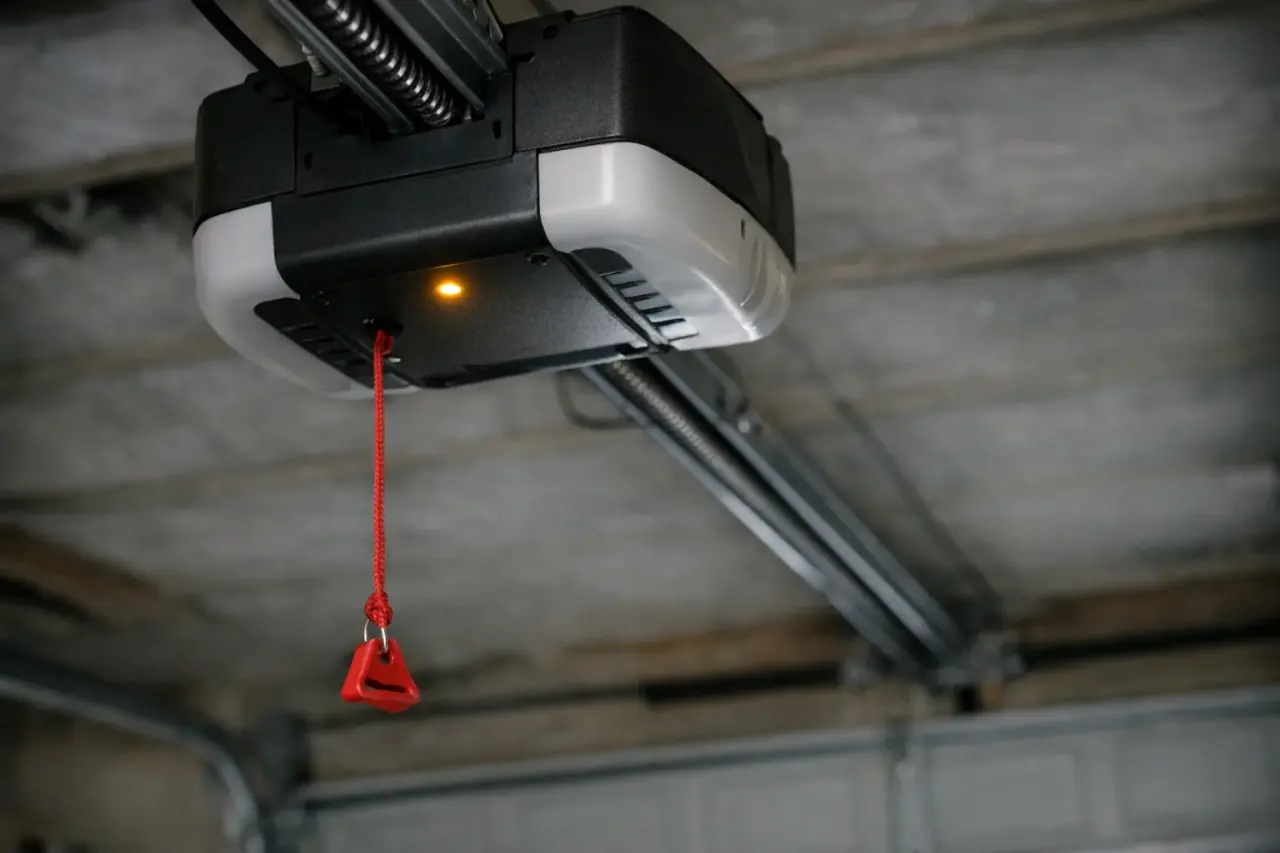
Which Genie opener do you have?
Genie makes chain, belt and screw-drive openers, and the fixes depend on which one is on your ceiling. The model number is printed on a label on the powerhead, the motor unit hanging from the ceiling. Write it down before you start; Genie's owner's manuals and diagnostic charts are organized by model.
A few Genie terms will help you follow the manual:
- Powerhead: the motor housing. On many models the diagnostic indicator light sits on the underside, next to the programming buttons.
- Wall console: Genie's name for the wall button. Many models have a Sure-Lock or vacation-lock switch on it.
- Safe-T-Beam: Genie's photo-eye safety sensors near the floor on each side of the door.
- Carriage: the part that rides along the rail and connects to the door arm. Pulling the red release cord disconnects it.
If you're still comparing brands for a replacement, see how Genie stacks up against Chamberlain and LiftMaster.
What should you check first?
Work through these in order. Most "dead" Genie openers turn out to be one of the first four.
- Confirm power. Plug a lamp into the outlet the powerhead uses. If the lamp stays dark, reset the breaker. Garage outlets are often on a GFCI that trips, sometimes from an outlet in another room or outside.
- Turn off Sure-Lock. When the vacation lock is on, remotes and keypads are ignored. It's an easy switch to bump while reaching for the light button.
- Check the carriage. If someone pulled the release cord, the motor runs but the door doesn't move. Follow your manual to re-engage the carriage, with the door closed. If the cord was pulled because the door was jammed, heavy or crooked, don't reconnect it; that points to a spring or cable.
- Look at the Safe-T-Beams. The red LED should be steady. Clean both lenses, clear anything in the beam's path and make sure neither sensor has been kicked or knocked out of line.
- Swap the remote battery. Genie notes that a remote LED that blinks while you press the button, or doesn't light at all, means a weak battery.
- Do the hand test. With the door fully closed, pull the release cord and lift the door by hand to about knee height. A balanced door moves smoothly and stays put. If it's very heavy or slams down, stop and call for spring service.
Safety warning: Don't try to adjust Genie's travel limits or force settings to make a heavy door move. The opener is only meant to guide a balanced door. Springs and cables hold dangerous tension and are not a DIY repair.
What do the lights on a Genie powerhead mean?
Genie's codes differ by model family, so match your model number to the right chart. On many chain, belt and ReliaG models, both indicator LEDs off means normal operation.
Chain, belt and ReliaG models
This chart follows Genie's published guide for the ChainLift 600 and 800, ChainLift 700, ReliaG 600 and 800, BeltLift 600 and QuietLift 800.
| Light | What it usually means | What to do |
|---|---|---|
| Red, on steadily | Programming isn't finished | Complete limit setup and add your remotes, per the manual |
| Red, 1 blink and pause | The remote hasn't been learned | Program the remote to the powerhead |
| Green, 1 blink and pause | Limits incomplete, beam blocked while closing, or the door met resistance | Set the limits, clear the beam, check the door and springs |
| Green, 2 blinks and pause | Up limit not set, bad wiring to the powerhead, or sensors misaligned or blocked | Set the up limit, inspect wiring, realign sensors |
| Green, 3 blinks and pause | Limits set backwards | Clear the limits and program them again |
| Green, 4 blinks and pause | Wall console wire shorted or reversed | Look for staples cutting the wire; repair wiring or the console |
| Green, 5 blinks and pause | Chain or belt too tight, or a control fault | Adjust tension per the manual; call for service if it persists |
Excelerator screw-drive models
Genie's Excelerator series, including the H8000, ISD990, ISD995, ISD1000, PRO99 and CMD9900 families, uses a status light under the lens cover with its own codes:
| Blinks | Problem | What to do |
|---|---|---|
| 1 | Motor drive board interrupt, or the opener sensed a poorly balanced door | Unplug for about 5 seconds and retry; if it recurs, have the door's balance and springs checked |
| 2 | Controller board interrupt | Reset the same way; recurring codes need a technician |
| 3 | Overheated or over-cycled | Don't unplug; let it rest while it restores cycles |
| 4 | Force settings incorrect | Force isn't preset at the factory; set it per the manual |
| 5 | Safe-T-Beam malfunction | Clean, realign or replace the sensors |
| 6 | Wall console not working | Check console wiring for shorts and pinched wires |
| 7 | Limit switches not working | Check limit switch wiring and connections |
| 8 | Wall console locked | Turn off the vacation lock |
If your model isn't listed, or the light does something these charts don't describe, check your owner's manual or contact Genie support before replacing parts.
Why does the motor run but the door won't move?
When you hear the motor but nothing happens, the drive isn't connected to the door.
- Carriage disengaged. The most common cause, usually after a power outage or someone pulling the cord.
- Broken or loose chain or belt. Look along the rail for a chain or belt that's off its sprocket or snapped.
- Screw-drive coupler. On screw-drive models, if the motor runs but the long screw inside the rail doesn't turn, the coupler between them has likely failed. If the screw turns but the carriage doesn't move, the carriage itself is worn.
- Grinding noises. Worn gears, a stripped coupler or a damaged carriage often grind before they quit.
On the chain, belt and ReliaG models in the first chart above, the opener also stops trying after about 30 seconds if the door doesn't move. That's a protection feature, not a fault. If the door is heavy by hand, the opener is the symptom and the springs are the problem.
Why does the door start down and then go back up?
A Genie door that reverses on the way down is usually responding to its safety system.
- Safe-T-Beams. A flashing red LED, sun shining straight into a sensor, a cobweb or a sensor knocked out of line will all send the door back up. Our sensor troubleshooting guide covers alignment in detail.
- Neighboring sensors. Genie notes that another opener's photo eyes nearby, from any brand, can interfere.
- Close limit or close force. If the door touches the floor before the opener expects it, it reads that as an obstruction.
- Binding. A dented track, worn rollers or a door rubbing on the jamb makes the opener think something is in the way; a tune-up clears that up before the opener takes the blame.
- New installs. Genie lists the door-arm position as a first check on newly installed openers.
To get the door closed tonight, press and hold the wall console button until it seats fully. For more causes, see why a garage door won't close.
Why does a Genie opener open or close by itself?
Phantom operation is unsettling, but the cause is usually electrical, not a break-in.
- Check for a stuck button on every remote, keypad and the wall console.
- Erase and reprogram remotes if one has been lost or stolen, so only the ones you hold still work.
- Suspect the wall console wiring. Genie names a short in the wall button or its wires as the most common cause. Staples, temperature swings, vibration and power surges can all do it. A technician can disconnect the console wiring at the powerhead to confirm.
- Look at your smart controller. If you use Aladdin Connect or another app, check its activity history and any schedules or automations.
- Check the close limit. A door that closes and then reopens may be hitting the floor sooner than the opener expects.
Which Genie problems need a technician?
Genie's own manuals tell owners to call an authorized dealer or trained door technician when the problem involves the door hardware or springs. In practice, that means:
- The door is heavy, uneven or slams during the hand test
- A cable is loose, frayed or off its drum
- The door is bent, crooked or off its track, which becomes emergency work once it leaves the house open
- Board codes keep coming back after a reset
- The drive system needs a new chain, belt, screw or rail
- The opener has no Safe-T-Beams or is old enough that parts are hard to find
If an older unit needs a board or motor, compare the repair against the signs it's time for a new opener.
Our technicians diagnose and repair garage door openers and fix the spring problems that cause many opener faults in the first place. To have someone look at it, book a visit.
Key takeaways
- Rule out power, Sure-Lock, the release cord and the Safe-T-Beams before anything else.
- Match your model number to the right Genie light chart; chain, belt and screw-drive codes differ.
- Motor runs, door doesn't move: the carriage, chain, belt or screw coupler isn't connected.
- Phantom openings usually trace back to wall console wiring or a stuck button.
- A heavy or crooked door is a spring or cable problem, and that's technician work.